Photo editors · 2026 field guide
Best photo editing app for Mac & Windows, compared by the job you actually do
Most photo edits are a crop, a resize or an arrow on a screenshot. A few need layers and masks. Those are two different tools. Start with what your computer already has, then pick by price, download size, and whether the same app runs on both your Mac and your PC.
The short answer
Which photo editing app should you choose?
For quick fixes, start with what's already there. Preview on a Mac and Photos on Windows crop, rotate, resize and tweak color for free. If that's all you do once a month, you don't need anything else.
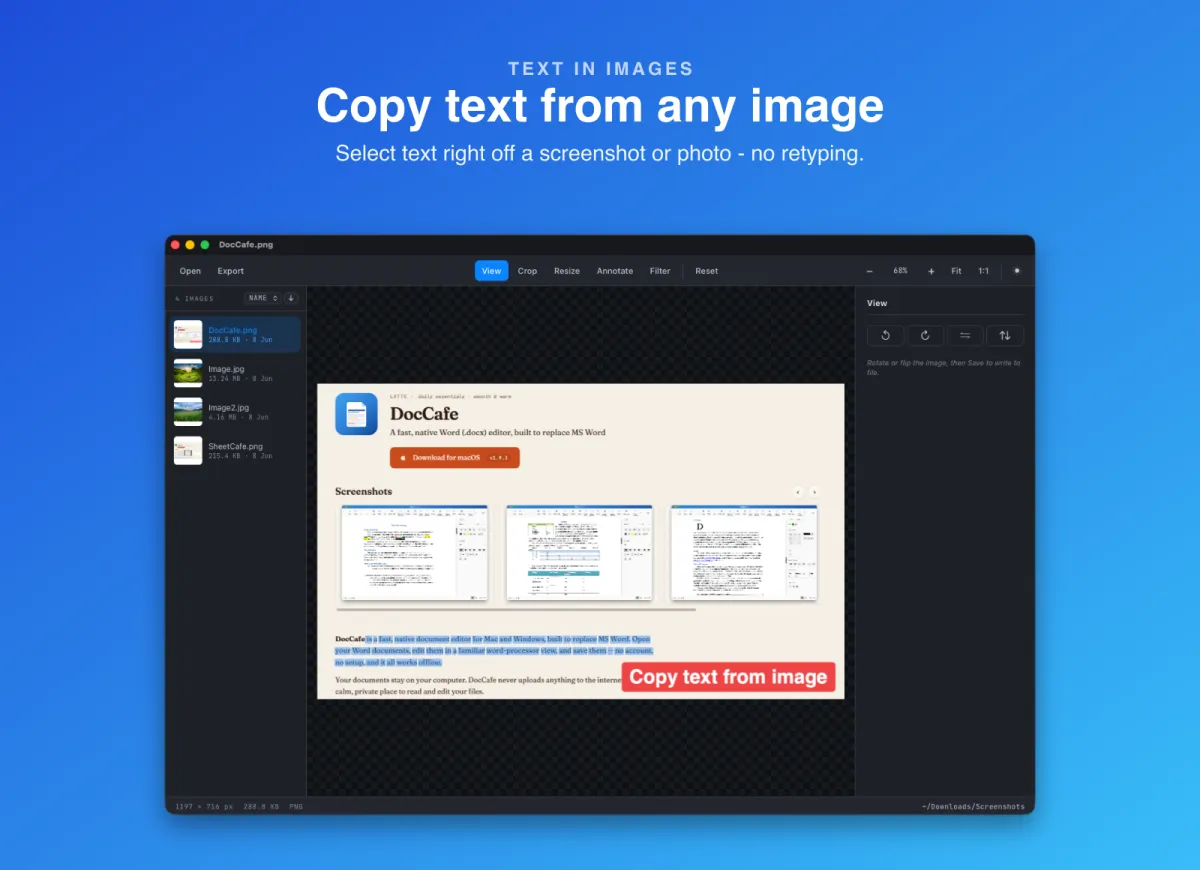
If you do it every day, our pick is Pixpresso. It's a free viewer and editor for Mac and Windows. Every image in a folder sits in a sidebar, and crop, resize, markup, filters and copying text out of a picture are one click away. No account. The Windows download is 5.5 MB.
For layers, masks and PSD files, our pick is CremaStudio. It opens layered PSDs and camera RAW, keeps adjustments live, and downloads at 17.8 MB on Mac and 6.8 MB on Windows. It comes with a getapps.cafe membership from $1.99/month, or $29.99 once on its own. We make both apps, so read those picks with the disclosure above in mind.
Affinity is the strongest free layered editor if a Canva account doesn't bother you. GIMP is the free, open-source choice with no account at all. Photoshop is still the tool to learn if you're heading into a studio that runs on it.
Method
How did we compare these photo editors?
"Photo editor" covers two very different jobs. One is the quick fix. Crop a screenshot, turn a phone photo upright, shrink a picture before you email it, circle a bug for a teammate. The other is real editing. Layers, masks, selections, retouching, a PSD someone handed you. A tool that's great at one is usually clumsy at the other, so we judged each app on the job it's built for.
Three questions decided the order. What does it cost after year one? A monthly plan and a one-off price look similar in month one and very different in year three. How heavy is it? We measured installer sizes from the official download servers and the Mac App Store in October 2026, so the numbers are real, not guessed. Does the same app run on Mac and Windows? If you use both, one tool that behaves the same on each saves you learning two.
The free built-in apps set the baseline. An editor doesn't get credit for cropping a photo. It has to save steps Preview or Photos leave you doing by hand. Competitor prices come from vendor pages checked in October 2026. Where a vendor page didn't list a price, we say so and give the figure third-party reviews report.
This is an editorial comparison, not a lab benchmark. We didn't invent speed scores. And we don't pretend to be neutral. If you need generative AI fill or a CMYK print workflow, Photoshop will serve you better than either of our apps.
Side by side
How do the best photo editing apps for Mac and Windows compare?
The useful comparison isn't the length of the feature list. It's whether the app fits the job, what it costs once the trial ends, and how much it asks of your disk and your patience.
| App | Best for | Price | Download | Important limitation |
|---|---|---|---|---|
| PixpressoOur app | Daily crops, resizes, markup and text from images | Free, no account | 9.8 MB Mac · 5.5 MB Windows | No layers, RAW or PSD |
| CremaStudioOur app | Layered editing, PSD and RAW, without a heavy install | $29.99 once, or included in getapps.cafe from $1.99/month | 17.8 MB Mac · 6.8 MB Windows | No generative AI; exports open formats, not PSD |
| Preview & Windows Photos | The occasional quick fix | Free, built in | Already installed | One image at a time; no layers |
| Affinity by Canva | Free pro-level photo, vector and layout work | Free; AI tools need a Canva paid plan | Not measured | Canva account needed to download |
| GIMP | Free, open-source editing with no account | Free (GPL) | 186 MB Mac · 190 MB Windows | Steep learning curve, unlike Photoshop |
| Adobe Photoshop | Studio work, generative AI, print | $22.99/mo on an annual plan | Via Creative Cloud app | Subscription only; cancel fees on annual plans |
| Pixelmator Pro | Mac users who want ML tools and a one-off price | $49.99 once | 571.5 MB, Mac only | No Windows version |
| Photopea | Opening a PSD on a computer you don't own | Free with ads; Premium removes them | None, runs in a browser | Browser tab, ads on the free tier |
Prices and sizes checked in October 2026. Download sizes are the installer files on each vendor's server (GIMP 3.2.6 arm64 .dmg and Windows setup) or the Mac App Store's listed size (Pixelmator Pro 3.8). Pixelmator Pro and Affinity details come from their official pages. Photoshop's price comes from Adobe's plan pages as reported in 2026 reviews; Photopea doesn't list Premium pricing on its home page, so check before paying.
Before you install anything
Are Preview and Windows Photos already enough?
Often, yes. On a Mac, open a picture in Preview. The Markup toolbar crops, rotates, draws shapes and adds text. Tools → Adjust Size resizes, Tools → Adjust Color fixes exposure and white balance, and File → Export converts between HEIC, JPEG, PNG and TIFF. Live Text lets you select words in a photo on recent macOS versions.
On Windows, the Photos app crops, rotates, straightens, adjusts light and color, applies filters and lets you draw on an image. Recent versions add AI tools such as erasing objects and blurring a background.
- you edit a photo now and then, not a folder of them every day;
- a crop, a rotate or a color nudge is the whole job;
- you only use one computer, so learning its own app is fine;
- you never need layers, masks or a PSD.
A separate app earns its place when the small steps repeat. Paging through a folder and fixing as you go. Typing an exact crop size. Copying text out of a screenshot. Using the same app on your Mac at home and your PC at work. And once you need layers, neither built-in app will do. That's where the rest of this list comes in.
The full list
What is each photo editing app best at?
Best for everyday edits · Our app
Pixpresso
Pixpresso is an image viewer and editor for the jobs that don't deserve a heavy photo suite. Open one picture and every other image in that folder lines up in a sidebar. The arrow keys step through them, and you can rename, duplicate or bin a file as you go. It runs on Mac and on Windows, both x64 and arm64.
The toolbar switches between View, Crop, Resize, Annotate and Filter. Crop to a free frame or lock it to 1:1, 3:2, 4:3 or 16:9, or type the exact position and size. Resize with the ratio locked and see the real output size before you save. Annotate with arrows, shapes, text and emoji, or drop in your logo as a watermark. Filters cover brightness, contrast, saturation and blur, plus nine preset looks.
The feature people don't expect is text. In View mode the words in a picture can be selected and copied: an address in a screenshot, code in a photo, a quote on a slide. That reading happens on your computer, and nothing is uploaded. Save writes back to the file. Export keeps the original and writes a JPEG, PNG, WebP or TIFF copy. Reset takes the file back to how it was before your first save.
It's free with no account, and the download is 9.8 MB on Mac and 5.5 MB on Windows. What it isn't is a layered editor. No layers, no masks, no RAW or PSD. HEIC opens on macOS only. For that kind of work, see CremaStudio below.
Best light layered editor · Our app
CremaStudio
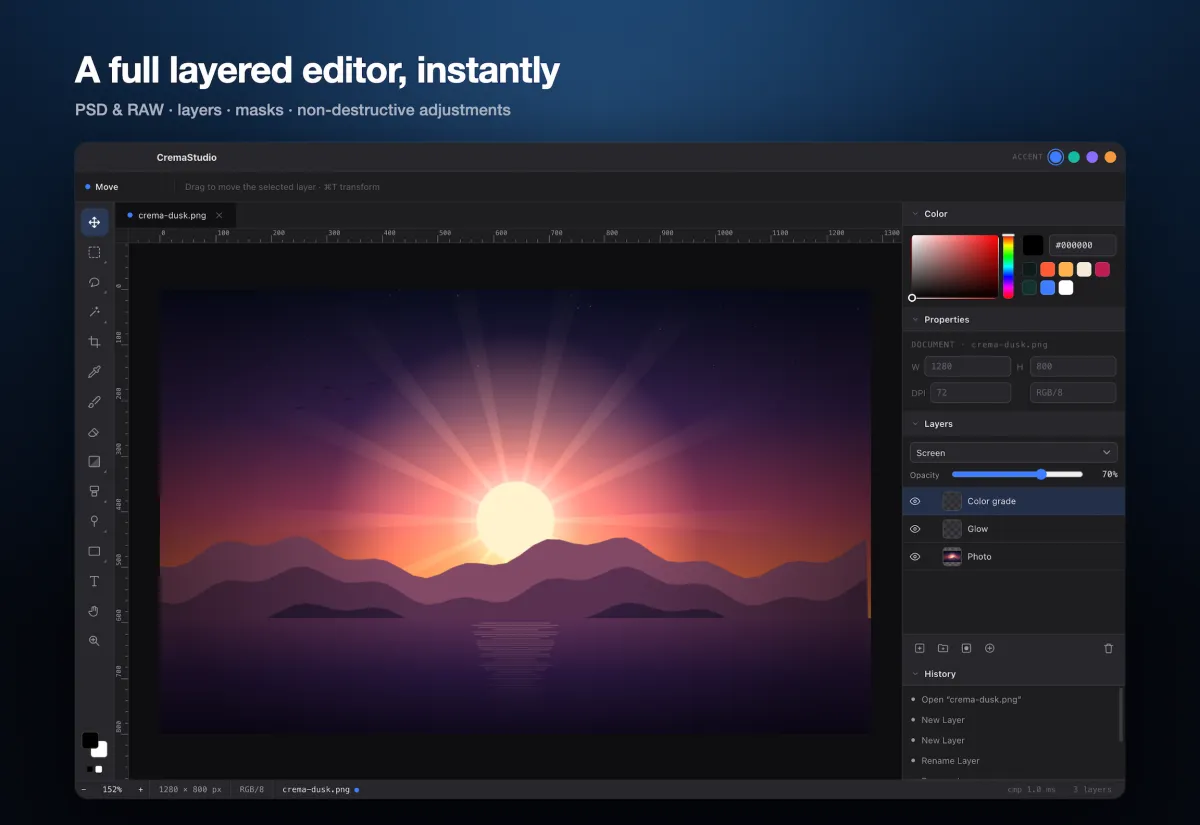
CremaStudio is a layered image editor for Mac and Windows that launches fast and stays out of the way. Tools on the left, layers and adjustments on the right, your image in the middle. The Mac download is 17.8 MB and the Windows one is 6.8 MB. That's a small fraction of GIMP's 186 MB or Pixelmator Pro's 571.5 MB.
The toolset is the part that matters. A full layer stack with groups, masks, opacity and blend modes. Curves, Levels, Hue/Saturation, Color Balance, Vibrance and Exposure as live adjustment layers you can re-edit any time. Marquee, lasso, magic wand, quick selection and Color Range. Free Transform with skew, distort and perspective. Layer styles like drop shadow, glow, bevel and stroke. Content-aware fill and spot healing to remove objects and blemishes.
It opens layered PSD files with their layers intact and develops camera RAW. You export to PNG, JPEG, WebP, TIFF or ORA, or keep a native .pho project with every layer. Be clear on the limits. It doesn't export back to PSD, it has no generative AI, and it isn't built for CMYK print work. If a client sends PSDs and expects PSDs back, Photoshop is still the safer bet.
CremaStudio comes with a getapps.cafe membership from $1.99/month with a 7-day free trial, which also gets you every other app on the menu. Or buy it on its own for $29.99, once. It needs a one-time sign-in to activate, then works offline.
Best free baseline
Apple Preview and Windows Photos
Both come with the system, so they cost nothing and need no install. Preview handles crop, rotate, resize, color adjustment, markup and format conversion. Windows Photos covers crop, straighten, light and color, filters and drawing, and newer versions add AI object erase and background blur.
The limits are about workflow. They're built around one picture at a time. There are no layers or masks, so any edit that needs more than one pass gets messy. And they're two different apps. If you switch between a Mac and a PC, you learn each one separately.
Start here if photo editing is a rare chore. Move on once you notice you're doing the same three steps every day.
Best free layered editor
Affinity by Canva
Affinity used to be three paid apps: Photo, Designer and Publisher. Since Canva bought Serif, they're one app, and it's free for individuals. You get pro-level layers, masks and RAW develop, plus vector and page layout in the same file. It runs natively on Apple silicon and Intel Macs and on Windows. An iPad version is listed as coming soon.
The catch is the account. Downloading goes through a Canva sign-in, and the AI tools need a Canva paid plan. Some long-time users who picked Affinity to get away from subscriptions are wary of that. Affinity's own page also says it "loves a dedicated GPU" on Windows.
If a Canva account doesn't bother you, it's the most capable free option here.
Best free and open-source editor
GIMP
GIMP has been the free answer to Photoshop for decades, and it's still free with no account, no ads and no upsell. Version 3.2.6 came out in September 2026. Layers, masks, curves, levels, a full set of selection tools and non-destructive filters are all there. It runs on Mac, Windows and Linux, and a big plug-in and script ecosystem fills the gaps.
The cost is time. GIMP's interface and shortcuts work differently from Photoshop, so the learning curve is real. The installer is about 186 MB on Mac and 190 MB on Windows. RAW editing leans on separate apps, and there's no generative fill.
Pick it if you want a free tool you'll never be asked to pay for, and you're happy to spend a weekend learning it.
Industry standard
Adobe Photoshop
Photoshop is the tool most studios, agencies and print shops run on. Its layers, masks, adjustment layers and retouching tools set the standard others copy. Generative Fill adds AI editing, Camera Raw handles RAW, and there's a full CMYK print workflow and a huge library of plug-ins, actions and brushes. If your job asks for Photoshop, this is the one to learn.
The price is the issue. It's subscription only. The single-app plan is about $22.99 a month on an annual commitment, roughly $276 a year, and reviews report about $34.49 a month without one. The Photography plan at $19.99 a month adds Lightroom and 1 TB of storage. Annual plans carry an early-cancellation fee, and in March 2026 Adobe agreed to a $150 million settlement with the US government over how hard cancelling was. Generative AI also runs on metered credits.
For a career in design, it's worth it. For cropping holiday photos and the odd PSD, it's a lot of money every month.
Best Mac-only editor with ML tools
Pixelmator Pro
Pixelmator Pro is a polished, Mac-native editor with layers, masks, non-destructive effects, RAW and PSD support. Its machine-learning tools stand out: Super Resolution upscales small images, ML Enhance fixes a photo in one click, and subject removal is fast. Shortcuts and AppleScript let you automate it.
It's $49.99 once on the Mac App Store, where the listing shows 571.5 MB. Apple bought Pixelmator in 2025 and now also offers it inside its Apple Creator Studio subscription at $12.99 a month, which leaves some users unsure what the one-off version's future looks like. The bigger limit for this guide: there's no Windows version at all.
If you only use Macs and want the ML tools, it's great value. If you also use a PC, it can't follow you.
Best in a browser
Photopea
Photopea is a Photoshop-style editor in a browser tab. Nothing to install. It opens PSD, XCF, Sketch and RAW files, and has layers, masks, adjustment layers and smart objects. Photopea says files are processed on your device and never leave it.
The free version shows ads. A Premium tier removes them, reported at about $5 a month, though Photopea doesn't list the price on its home page. Because it lives in a browser tab, very large files depend on how much memory the browser will give it.
It's the right tool when you need to open a PSD on a computer you don't own. For daily work, a desktop app is calmer.
Buying criteria
Which photo editor features actually matter?
Do you need layers at all?
Ask this first. Cropping, resizing, rotating, color tweaks and markup don't need layers. Preview, Photos and Pixpresso handle them. Compositing, retouching and editing a PSD do. That's CremaStudio, Affinity, GIMP, Photoshop, Pixelmator Pro or Photopea.
Do you use a Mac and a PC?
Pixpresso, CremaStudio, Affinity, GIMP and Photoshop run on both. Photopea runs anywhere with a browser. Pixelmator Pro is Mac only, and Preview and Photos are each tied to their own system.
How much disk and patience can you spare?
Pixpresso is 9.8 MB on Mac and 5.5 MB on Windows. CremaStudio is 17.8 MB and 6.8 MB. GIMP is about 186 MB and 190 MB, and Pixelmator Pro is 571.5 MB. A small app downloads in seconds and fits on an older laptop without a fight.
Will you open or send PSD files?
CremaStudio, Affinity, GIMP, Pixelmator Pro and Photopea all open PSDs. If a client expects layered PSDs back, Photoshop is the only one that guarantees a perfect round trip. CremaStudio exports open formats and its own .pho project, not PSD.
Do you want AI to do the editing?
Photoshop's Generative Fill, Affinity's AI tools on a Canva plan, Pixelmator Pro's ML tools and the AI erase in Windows Photos all do this. CremaStudio's content-aware fill and spot healing rebuild an area from nearby pixels, with no generative AI. Pixpresso keeps everything on your computer, including reading text.
What will it cost in year three?
Photoshop at $22.99 a month is about $830 over three years. Pixelmator Pro is $49.99 once. Affinity, GIMP, Preview, Photos and Pixpresso cost nothing. CremaStudio is $29.99 once on its own, or included in a getapps.cafe membership from $1.99/month if you also use the other apps on the menu.
Build your photo kit
What else helps with everyday image work?
An editor isn't the only tool that touches your pictures. Some jobs are faster with a small app that does one thing well, rather than a menu hunt in a big one.
Common questions
What else should you know before choosing?
What is the best free photo editor for Mac and Windows?
For quick edits, Pixpresso is free on both, with no account, and downloads at under 10 MB. For layered editing, Affinity is free with a Canva account, and GIMP is free and open source with no account at all. Preview on Mac and Photos on Windows are free too, but each only runs on its own system.
Is there a Photoshop alternative that doesn't need a subscription?
Yes. GIMP and Affinity are free. Pixelmator Pro is $49.99 once, on Mac only. CremaStudio is $29.99 once, or included in a getapps.cafe membership. All of them open PSD files. Only Photoshop exports a PSD that's guaranteed to round-trip perfectly.
Can I open PSD files without Photoshop?
Yes. CremaStudio opens layered PSDs with their layers intact. Affinity, GIMP, Pixelmator Pro and Photopea open them too. Complex files with newer Photoshop-only effects may not look identical in any of them, so check the result before you send it on.
Which photo editor is lightest?
Of the installers we measured, Pixpresso is the smallest at 5.5 MB on Windows and 9.8 MB on Mac. CremaStudio, a full layered editor, is 6.8 MB on Windows and 17.8 MB on Mac. GIMP is about 186 MB to 190 MB, and Pixelmator Pro's App Store listing is 571.5 MB. Preview and Photos are already installed.
How do I copy text from an image?
On a recent Mac, Preview's Live Text lets you select words in a photo. Pixpresso does it on Mac and Windows: open the image in View mode, select all the words or drag across the part you need, and copy. The reading happens on your computer, nothing is uploaded.
Our recommendation
Match the tool to the job, not the brand.
For quick fixes every day, get Pixpresso. It's free. When you need layers, masks and PSDs on a Mac or a PC without a monthly Adobe bill or a 500 MB install, try CremaStudio. It comes with the full getapps.cafe menu.