Resume & CV builders · 2026 field guide
Best resume apps for Mac & Windows, compared by what the PDF really costs
Most resume builders let you type for free and charge you at the download button. Start with the templates you already own. Then pick a tool by where it stores your data, how clean the PDF exports, and what it actually costs after the trial ends.
The short answer
Which resume app should you choose?
If you already have Microsoft Word or Apple Pages, open a simple one-column template and hit Export as PDF. It gets the job done. You do not need a dedicated builder for a single, carefully written CV.
When you start tailoring a resume for every application, our pick is ResumeRoast. It is a native desktop app for Mac and Windows with a live A4 preview, 12 resume templates, and a clean PDF export with no watermark. You skip the web account form. Your details stay on your own computer. It comes with a getapps.cafe membership from $4.99/month. We make it, so read that recommendation with the disclosure above in mind.
Reactive Resume is the best completely free option. Open source, no paywalled templates, and self-hostable if you want total control. Kickresume is the most generous commercial web builder, offering unlimited downloads on its free tier. Canva suits designers. A visual layout matters more there than pleasing an applicant-tracking system.
Method
How did we compare these resume apps?
A resume tool has one job. It turns your experience into a clean, readable document you can send today and adapt tomorrow. We judged each option on the parts that actually cause friction. Getting from a blank page to a finished layout. Keeping formatting stable as content grows. Pushing out a PDF that both people and applicant-tracking systems can read, and maintaining several tailored versions without moving loose files around.
Two questions matter here. First, what does the PDF cost? Several popular builders let you write for free and require a subscription at the final step, often behind a cheap trial that renews automatically. Second, where does your data live? A resume carries your phone number, address, work history, and maybe a photo. Keeping that on your own disk rather than in a company's database makes a real difference.
Free templates in Word and Pages set the baseline. A builder doesn't get credit for making a resume. It has to remove manual steps a word processor leaves behind. Features and prices for the five third-party competitors come from our structured research dataset, verified against vendor pages in September 2026. If a page was down, we note it.
This is an editorial comparison. It is not a hiring study. We did not invent "interview rate" statistics or ATS scores, and we do not pretend our app is a neutral bystander. If you want a hosted share link or an AI writing assistant, another tool on this list will fit you better than ours.
Side by side
How do the best resume apps for Mac and Windows compare?
The useful comparison is not the raw number of templates. It is whether the tool gets you a clean PDF without a surprise charge, keeps your personal details where you want them, and makes the next tailored version fast.
| App | Best for | Price model | Important limitation |
|---|---|---|---|
| ResumeRoastOur app | Private, offline resumes and cover letters on Mac and Windows | Included in getapps.cafe, from $4.99/month | No AI writing assistant or hosted share link |
| Word & Pages templates | A single, carefully written resume | Pages free on Mac; Word via Microsoft 365 or free on the web | Layouts drift as content grows; versions are loose files |
| Reactive Resume | A free, open-source builder with no paywall | Free (MIT); optional self-hosting | Browser-based; self-hosting needs a server |
| Kickresume | A polished web builder with AI help | Free tier; Premium $19/mo, $27/quarter, or $54/year | Most templates and AI tools are Premium-only |
| Canva | Visually designed resumes for creative roles | Free plan; Pro subscription (about $180/year reported) | Heavy layouts can parse poorly in tracking systems |
| Resume.io | Guided step-by-step building with share analytics | $2.95 7-day trial → $29.95 every 4 weeks | Free plan downloads TXT only; PDF needs a paid plan |
| Zety | Pre-written bullet points by job title | ~$2 14-day access → $25.95 every 4 weeks | PDF download requires paying; trial renews automatically |
Prices checked in September 2026. Resume.io and Kickresume figures come from their official pricing pages. Zety's official pricing page timed out and Canva's blocked verification, so those figures are reported by multiple 2026 third-party reviews; check the vendor before buying.
Before you install anything
Are Word or Pages templates already enough for a resume?
Often, yes. On a Mac, open Pages, choose File → New, and pick a layout from the Resumes group (called CVs in some regions). Use File → Export To → PDF when you finish. In Microsoft Word on Mac or Windows, search the template gallery for "resume" and save the result as a PDF. Word for the web is free with a Microsoft account if you lack a Microsoft 365 subscription.
Choose the plainest one-column template you can find. Text boxes, tables used for layout, and decorative icons can confuse applicant-tracking systems. They also make a standard template fall apart the moment you add a sixth bullet point.
- you are sending one resume, not a tailored version per job;
- your history fits cleanly on one or two pages;
- you are comfortable nudging spacing and page breaks by hand;
- you do not need a matching cover letter design.
A dedicated app proves its worth when those manual steps repeat. Separating content from layout means you change the design without retyping. The page never reflows unexpectedly. Each tailored copy keeps its own formatting. That is the gap every app below tries to fill, doing it in very different ways and at very different prices.
The full list
What is each resume app best at?
Best private desktop builder · Our app
ResumeRoast
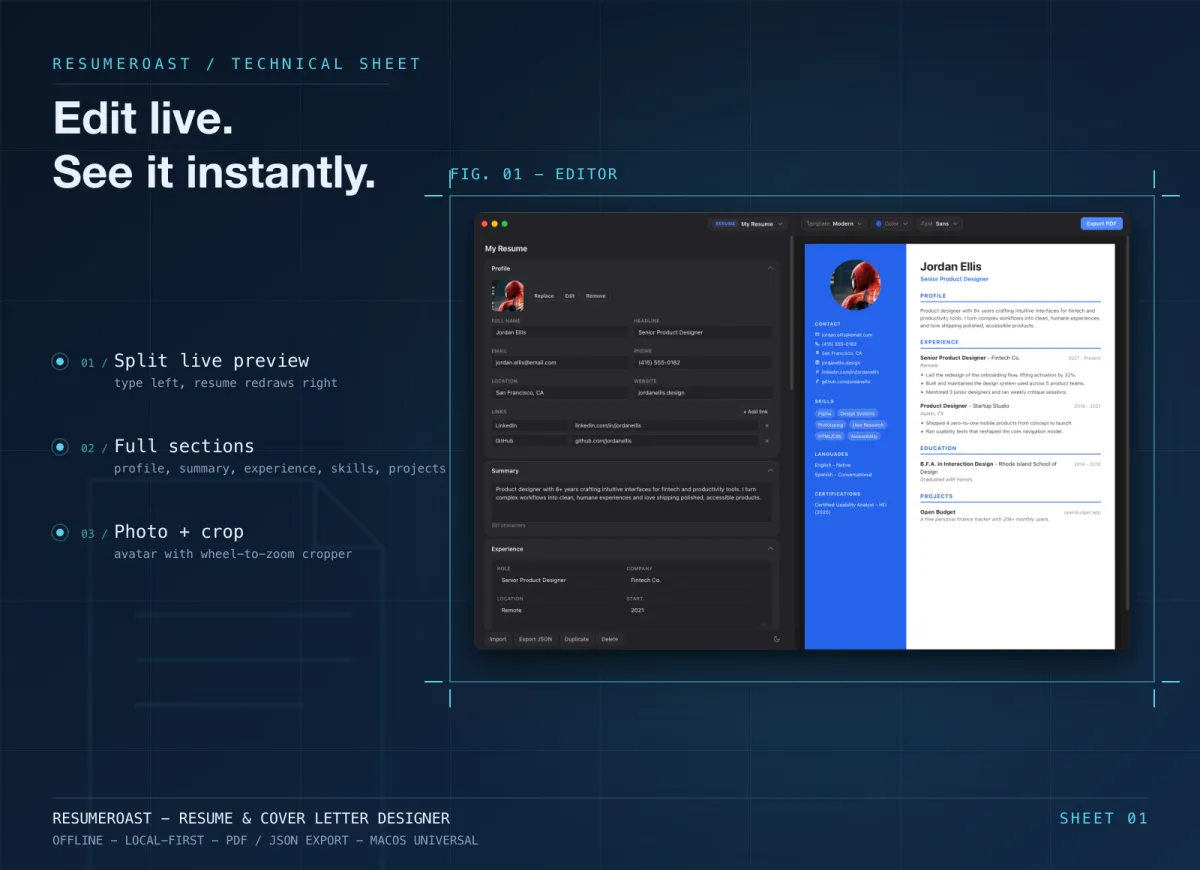
ResumeRoast is a native desktop app for macOS and Windows, on both x64 and arm64. You fill in guided sections for your profile, summary, experience, education, skills, projects, certifications, and languages. Add your own custom sections if you need them. A true-to-scale A4 preview redraws on the right as you type. Export produces a clean, edge-to-edge PDF with no watermark.
It ships with 12 resume templates, from Classic/ATS and Minimal to Executive and Bold, plus 6 matching cover-letter designs. A cover letter borrows your name and contact details, matching the look exactly. Switching template reflows your content instantly. An accent-color picker and font choice cover the visuals. A built-in cropper frames your photo for the templates that use one, though the ATS-friendly designs stay text-only.
The reason to choose it is the workflow for applying to ten different places. Duplicate a resume, tailor it for one role, and that copy keeps its own template and content. The original stays untouched. Everything is stored locally. You skip the sign-up form on a website, leave no cloud copy of your details, and can back up any resume as a JSON file. No AI writer writes your bullet points, and it doesn't host a share link. You send the PDF yourself.
ResumeRoast comes with a getapps.cafe membership from $4.99/month with a 7-day free trial. That gives you every other app on the menu. It needs a one-time sign-in to activate, then works offline. If a single resume is all you need this year, a free option above fits better.

Best free baseline
Microsoft Word and Apple Pages templates
The tools you already own make an honest starting point. Pages is free on every Mac and exports PDF and .docx. Word's .docx is the industry-standard format. Word for the web is free with a Microsoft account, while the desktop app comes with Microsoft 365 Personal at $9.99/month or $99.99/year. Both have templates. Both give you total control over every line.
That control acts as the main weakness. Content and layout share the same document. Adding a single role can push a heading onto the next page, and switching to a new design means starting over. Tailored versions turn into a messy folder of loose files. Many visual templates rely on tables and text boxes that applicant-tracking systems may not read in order.
Start here if you need one resume. Move to a dedicated app once the manual layout work takes longer than writing the bullet points.

Best free and open-source builder
Reactive Resume
Reactive Resume is an MIT-licensed open-source project with about 43,600 GitHub stars. It is completely free on its hosted site. No paywalled templates, no ads, no tracking. You can self-host it with Docker if you want your data on your own server. It exports to PDF, JSON, and DOCX.
It offers optional AI writing help. You bring your own API key for OpenAI, Google Gemini, or Anthropic Claude. It publishes a resume as a public, password-protected, or private link. For a developer or anyone comfortable with open-source tools, it is the most generous option here.
The limits are specific. It runs in a browser, not as a native desktop app. The hosted version stores your data online, and self-hosting requires running a server. You also get fewer designed templates than the commercial tools offer.

Best freemium web builder
Kickresume
Kickresume stands out among commercial builders because its free tier includes unlimited downloads. That free plan gives you 4 basic resume and 4 matching cover-letter templates, a bank of 20,000 pre-written phrases, and over 1,500 resume examples. You can produce a real document here without paying a cent.
Premium adds 40+ templates, an AI Writer, an ATS resume checker, and personal website templates. It runs $19 for a single month, $27 a quarter, or $54 a year, backed by a 14-day money-back guarantee. If you want AI help drafting your bullet points, it hits the most reasonable price point in this tier.
Like every web builder, editing happens in a browser. Your details sit in an online account. Pick it if you accept that trade-off and value the AI assistance. Choose a local tool if privacy rules your decision.

Best for visual, creative resumes
Canva
Canva is a design tool first. It just happens to carry a large resume template library. It has desktop apps for Mac and Windows that wrap the web editor, exporting to PDF and PNG. You use the exact same drag-and-drop canvas as every other Canva design. For illustrators and marketing roles, handing over a visually distinct page can be the whole point.
That freeform canvas brings a heavy cost. Multi-column layouts, custom icons, and graphics can parse poorly in an applicant-tracking system. Because nothing holds a rigid structure, adding a line of text means moving other boxes by hand. Many templates and visual elements demand Canva Pro, a subscription reported at $180 a year for one person in September 2026 after several increases since 2024.
Use Canva when the job demands a portfolio-style one-pager. For corporate applications shoved through an online portal, a plain, structured PDF serves you better.

Best guided web builder
Resume.io
Resume.io walks you through each section step-by-step. It provides pre-written phrases, and paid plans throw in unlimited resumes, premium templates, unlimited PDF downloads, and share links with view analytics. It delivers a smooth experience in the browser and across its mobile apps.
The pricing is the catch. The free plan permits one resume and one cover letter, downloading them as TXT only. A PDF requires a paid plan. A $2.95 7-day trial renews automatically at $29.95 every four weeks, or $49.95 every three months. It offers a 7-day money-back guarantee, but you have to remember to hit cancel.
Pick it for a short, intensive job search. The guidance saves actual time. Just set a calendar reminder to cancel the day you finish.

Best for pre-written content
Zety
Zety leans entirely into content. The builder suggests bullet points by job title. It includes AI-assisted wording, a cover letter builder, and a resume checker. If you stare at a blank screen struggling with what to say, these prompts get you unstuck fast.
You can build a resume for free. Downloading a usable PDF requires paying. Third-party reviews in 2026 report 14-day access for roughly $1.95 to $2.95 that renews automatically at $25.95 every four weeks. An annual option sits around $71.40. Forgotten renewals come up again and again in user reports. We could not load the official pricing page during our research, so verify the terms before handing over a card.
Zety serves as a practical short-term tool if the writing prompts are what you need. For a job hunt lasting longer than a few weeks, the options above cost less.
Buying criteria
Which resume app features actually matter?
Can you download a PDF for free?
Ask this first. Word, Pages, Reactive Resume, and Kickresume's free tier produce a PDF without payment. Resume.io's free plan exports TXT only, and Zety requires a paid plan for any download. ResumeRoast includes PDF export with the membership and keeps it watermark-free.
Where does your personal data live?
Web builders store your name, contact details, and job history in an online account. ResumeRoast, Word, and Pages keep the file on your local disk. Reactive Resume offers a middle path. It lives online, or on a server you control if you self-host.
Will the layout survive an applicant-tracking system?
Many employers run resumes through tracking software before a human reads them. Simple one-column layouts with actual text headings survive this best. ResumeRoast's Classic/ATS template and plain Word or Pages files work well. Heavily designed Canva templates pose the biggest risk.
How easy is the second, tailored version?
Tailoring a resume to each job description separates a real app from a static template. Look for one-click duplication. You want a way to switch designs without retyping. ResumeRoast, Reactive Resume, Kickresume, Resume.io, and Zety separate the content from the layout. Word, Pages, and Canva force you to edit each separate document by hand.
Do you need AI to write for you?
If the blank page stops you, Kickresume's AI Writer, Zety's suggestions, and Resume.io's pre-written phrases help. Reactive Resume supports AI using your own API key. ResumeRoast deliberately avoids sending your content to an AI service. You write the text, and it handles the layout.
What will it cost after the trial?
Look at the renewal price, not the headline trial figure. Resume.io and Zety renew every four weeks. That adds up fast in a slow job search. Kickresume's annual plan and Canva Pro run as yearly subscriptions. Reactive Resume and Pages cost nothing. ResumeRoast requires a getapps.cafe membership from $4.99/month, bringing the most value if you actually use the other apps on the menu.
Build your application kit
What else goes into a job application?
A resume is rarely the only file you send. Employers ask for Word documents, signed forms, and PDFs you did not create. Keep those jobs separate. It helps you avoid paying for a large suite just for one missing feature.
ResumeRoast keeps a version per job, all offline on Mac and Windows.
Word documents When they ask for .docxDocCafe opens, edits, and saves Word files offline.
PDF forms Sign and fill offer paperworkPDFCafe reads, annotates, signs, and fixes typos directly in the PDFs you receive.
Common questions
What else should you know before choosing?
What is the best free resume app for Mac and Windows?
For a single resume, use a plain template in Pages or Word for the web. Pages is free on Mac, and Word is free with a Microsoft account. For a dedicated builder at no cost, Reactive Resume provides an open-source tool with zero paywalled templates. Kickresume's free tier includes unlimited downloads with a smaller template set.
Is there a resume builder that works offline?
Yes. ResumeRoast is a native desktop app for macOS and Windows. It stores everything locally and exports your PDF without an internet connection after a one-time sign-in. Word and Pages templates also work offline. Most dedicated builders, including Resume.io, Zety, Kickresume, and the hosted Reactive Resume, force you into a browser.
Why does my resume builder charge to download a PDF?
Several web builders, including Resume.io and Zety, let you type out your life history for free and charge at the export step. They usually do this through a low-priced trial renewing every four weeks. If you already wrote your content there, copy it into a free template or a builder that actually includes a PDF export.
Are Canva resumes ATS-friendly?
Some work, but many fail. Canva's visual templates rely on multiple columns, custom icons, and graphics. Applicant-tracking systems may read these out of order or skip them entirely. For an online application portal, stick to a simple one-column layout with real text headings. Save the designed Canva version for an in-person meeting.
Should a resume be a PDF or a Word file?
A PDF preserves your layout exactly. Make it your default. Send a .docx only when an employer or recruiter explicitly asks for one, usually because they want to reformat it. Reactive Resume exports both. Word and Pages save either format. ResumeRoast exports PDF.
Our recommendation
Pay for layout help, not for the download button.
Use a free template if you just need one resume. When you start applying to dozens of roles and want each version tailored, private, and exported as a clean PDF, try ResumeRoast. It comes with the full getapps.cafe menu.