How to Audit Your Mac App Subscriptions in One Afternoon
Most people underestimate their subscription list. A one-afternoon audit: where the charges hide, how to build the list, and what to do with the number.
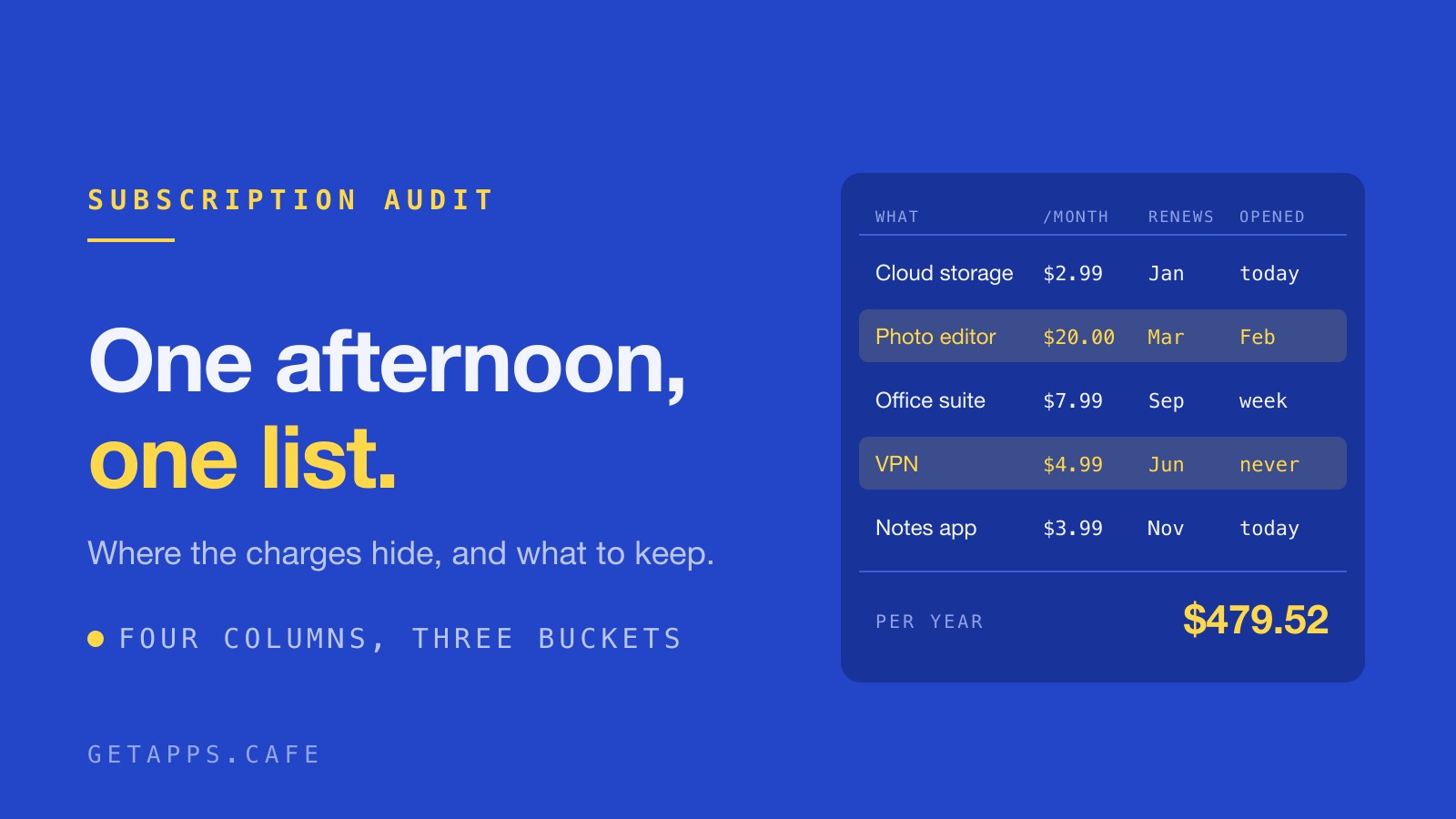
An annual renewal email is the worst kind of bill. It lands on a Tuesday, it's larger than the charges you stopped noticing months ago, and it's for something you signed up for eleven months earlier and opened twice.
Most people can name four or five subscriptions from memory and are paying for more than that. The ones you forget are billed quietly, and they hide in the same handful of places every time.
Where they hide
The card or bank statement is the most complete list you own, provided you search twelve months instead of one. Charges that repeat stand out. Annual renewals appear once, land inside an ordinary-looking month, and are gone from memory by the time the next one arrives.
On a Mac, System Settings → Apple ID → Media & Purchases → Subscriptions lists everything billed through Apple. That list is accurate for anything Apple bills, and it misses the services you pay for on their own websites, which charge you directly and never appear there.
Your inbox is the third place, and usually the most revealing. Search for "receipt", "your subscription", "renews on" and "payment received". Mail keeps the confirmation email with the price you agreed to, which is often not the price you're paying today.
While the statement is open, check the charges attached to hardware you no longer use. An old iPad, a work laptop you handed back, a phone that lives in a drawer. The account keeps billing whether or not the device is still in the house.
One list, four columns
Put everything you find into a single list with four columns:
- What it is
- What it costs per month
- When it renews
- When you last opened it
Convert the annual plans before you compare anything. An annual plan at $95.88 is one number a year and $7.99 a month, and moving it into that column is what makes the list readable at a glance.
The fourth column is the one that changes what you do next. It's also the one nobody fills in, because remembering when you last opened an app is harder than reading a price.
If a column feels like guesswork, that's useful information. A price you can't remember is a price you aren't tracking, and a renewal date you don't know is the one that shows up as a surprise.
Three buckets
Sort the list three ways, and be honest about the middle one.
Used in the last month. Keep it and stop spending attention on it. A tool you open every week is cheap at almost any price, because the alternative is doing that job by hand.
Used occasionally. This is the hard middle. Twenty dollars a month for something you touch once a quarter is $240 a year you never decided to spend. The full tally behind that arithmetic is in Subscription Fatigue Is Real.
Forgotten. Cancel it today. A renewal doesn't wait for you to get around to it, and "after this cycle" is how the cycle happens again.
The total
Add the column up and look at the number. It's usually bigger than the guess, and the point is to turn a background process into a decision.
Two numbers are worth keeping apart. The figure you pay each cycle is what changes behaviour, because it's the one you compare against the next thing you're asked to pay for. The yearly one is what the year actually costs, and it's the one that makes it feel real.
A few of the entries will deserve their place. Software you use every week pays for itself, and the total gives you a fair comparison for everything else. The Real Cost of Mac App Subscriptions in 2026 works the same ground from the other end, starting from what the categories cost rather than what you happen to pay.
Four places the audit gets stuck
Annual renewals. You convert the price for the comparison, then set a calendar reminder two weeks before it charges. Decide before the charge, not after it.
Family sharing. One person pays and several people use, and those aren't always the same people. Ask before you cut something a household member relies on.
Free trials that converted. The trial was a decision. The subscription is a second decision, and it's the one sitting on your statement.
Accounts you can no longer sign into. That is a support problem before it's a budget problem, and it's why some subscriptions outlive their owners' patience. Start the password reset today, because you can't cancel what you can't log into. What Happens When Your App Subscription Lapses covers the version of this that isn't your fault.
The four jobs that show up on almost every list
Most lists, once written down, contain the same four jobs twice: capture, passwords, PDFs and cleanup. A screenshot tool billed yearly, a password manager, something that merges and signs PDFs, and a cleaner that promises to find the junk.
Each of those jobs has a native counterpart on the menu, included in the membership instead of billed on its own: CreamShot X for capture, PassBrew for passwords, PDFCafe for the PDF work, and DripCleaner for the cleanup pass. The first and last sit on the Espresso shelf with the other small utilities, and the password manager is on Cold Brew. If the audit tells you a job is worth paying for, it has also told you what that job should cost. The case for buying one outright instead of renting it is in One-Time Purchase vs Subscription.
What to do with the count
Once the number is on paper, the interesting question stops being which single app to cancel and becomes whether the set is worth more than the sum of its parts. Eight tools covering eight adjacent jobs is a stack, and cutting two of them often costs more in time than it saves in money.
The count is what wears people down: eight renewals, eight prices that move, eight chances to be surprised on a Tuesday morning. That's the shape of problem a bundle is built to solve, and it's the only honest pitch for one.
The point of the afternoon
You finish with two things: a number you chose, and a calendar reminder set two weeks before the next renewal. Run it once a year and the list never gets away from you.
If most of what's on your list turns out to be small tools doing small jobs, the membership is built for exactly that shape of list: 127 native apps for macOS and Windows, from $4.99 a month billed yearly ($59.88) or $9.99 monthly, with Family Roast at $7.99 a month billed yearly ($95.88) or $15.99 monthly for up to five devices. The 7-day free trial adds a card when it starts and charges nothing until it ends.