How to Write Math Homework in LaTeX Without Installing Anything
The LaTeX a problem set needs: inline and display math, align, fractions, integrals and sums, matrices and the everyday symbols. Every snippet was checked in real pdflatex and in LatteX's preview, including the ones LatteX can't draw yet.
You have a problem set due. The instructions specify that it must be typed, cell phone photos of handwritten sheets will be rejected, and the tutorials start with installing a multi-gigabyte TeX distribution. An editor that skips that step is a much better place to start, and we have made that argument before. Taking a path without a TeX distribution just means you install the editor itself, and nothing else.
Everything in the method sections below is plain LaTeX that works in any LaTeX editor. We checked every snippet two ways. They compile under real pdflatex from TeX Live 2026 (TinyTeX) with zero errors, and we also ran them directly through the preview pipeline taken from the LatteX 2.1.0 source. The preview covers the basics well. Where it falls short, the last section of this guide says exactly what breaks and what you can do instead.
The file around your answers
A LaTeX document is a plain text file that wraps your content in a preamble.
\documentclass[letterpaper]{article}
\usepackage{amsmath,amssymb}
\title{Math 201 - Homework 3}
\author{Your Name}
\begin{document}
\maketitle

\section*{Problem 1}
Your answer goes here.

\end{document}
The preamble tells the engine what packages to load. The amsmath package gives you the align environment, the \text command, matrices, cases, and \binom. The amssymb package provides the blackboard bold font for \mathbb. The \section* command makes an unnumbered heading for each problem. Passing letterpaper sets the document to US Letter. Leave it out, and the page is A4.
Inline math and display math
Equations sit in a sentence, or they sit on their own line.
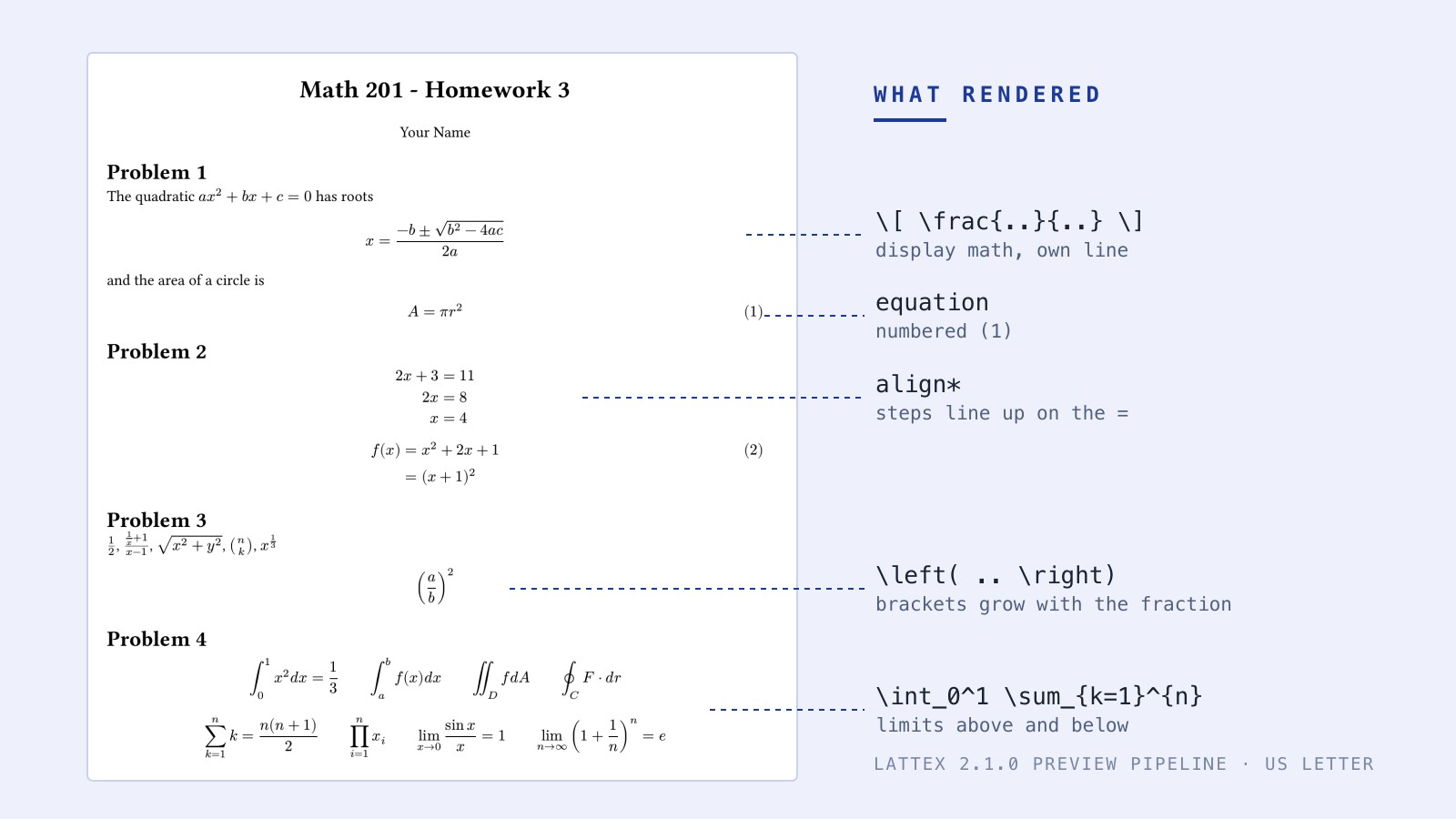
The quadratic $ax^2 + bx + c = 0$ has roots
\[ x = \frac{-b \pm \sqrt{b^2 - 4ac}}{2a} \]
and the area of a circle is
\begin{equation}
A = \pi r^2
\end{equation}
Wrap math in single dollar signs $...$ to keep it inline with your text. For a display equation on its own line, use \[ ... \]. If you need a numbered equation so you can refer to it later, use the equation environment. It prints a (1) at the right margin. Tutorials often tell you to use $$ $$ for display math, but that form is plain TeX, not LaTeX. Use \[ \] instead.
Lining up the steps with align
When a calculation takes four lines, the equals signs need to align vertically.
\begin{align*}
2x + 3 &= 11 \\
2x &= 8 \\
x &= 4
\end{align*}

\begin{align}
f(x) &= x^2 + 2x + 1 \\
     &= (x + 1)^2 \nonumber
\end{align}
The ampersand & marks the point that lines up. Put it before the equals sign. A double backslash \\ ends a row. The align* environment leaves the rows unnumbered, while align numbers every row. If you want to drop the number for an intermediate step, add \nonumber before the row ends. Do not put a double backslash after the last row.
Fractions, roots and brackets that grow
Fractions nest.
$\frac{1}{2}$   $\frac{\frac{1}{x} + 1}{x - 1}$   $\sqrt{x^2 + y^2}$
$\binom{n}{k}$   $x^{1/3}$
\[ \left( \frac{a}{b} \right)^2 \]
The \frac{top}{bottom} command builds a fraction, and you can put fractions inside fractions. Write \sqrt{...} for a square root and \binom{n}{k} for binomial coefficients. A cube root is x^{1/3}. Normal parentheses are fine for single variables, but \left( ... \right) sizes the brackets to what is inside. Curly braces group characters together. If you write x^10, you get x to the power of 1 followed by a normal 0. Write x^{10}.
Integrals, sums and limits
Subscripts and superscripts do double duty as limits.
\[ \int_0^1 x^2 dx = \frac{1}{3} \qquad \oint_C F \cdot dr \]
\[ \sum_{k=1}^{n} k = \frac{n(n+1)}{2} \qquad \prod_{i=1}^{n} x_i \]
\[ \lim_{x \to 0} \frac{\sin x}{x} = 1 \qquad
   \lim_{n \to \infty} \left(1 + \frac{1}{n}\right)^n = e \]
The underscore _ sets the lower limit, and the caret ^ sets the upper limit. They attach to \int, \iint, \oint, \sum, \prod, and \lim. You build the arrow under a limit with x \to 0.
Matrices and piecewise functions
Grids use the same syntax as aligned equations.
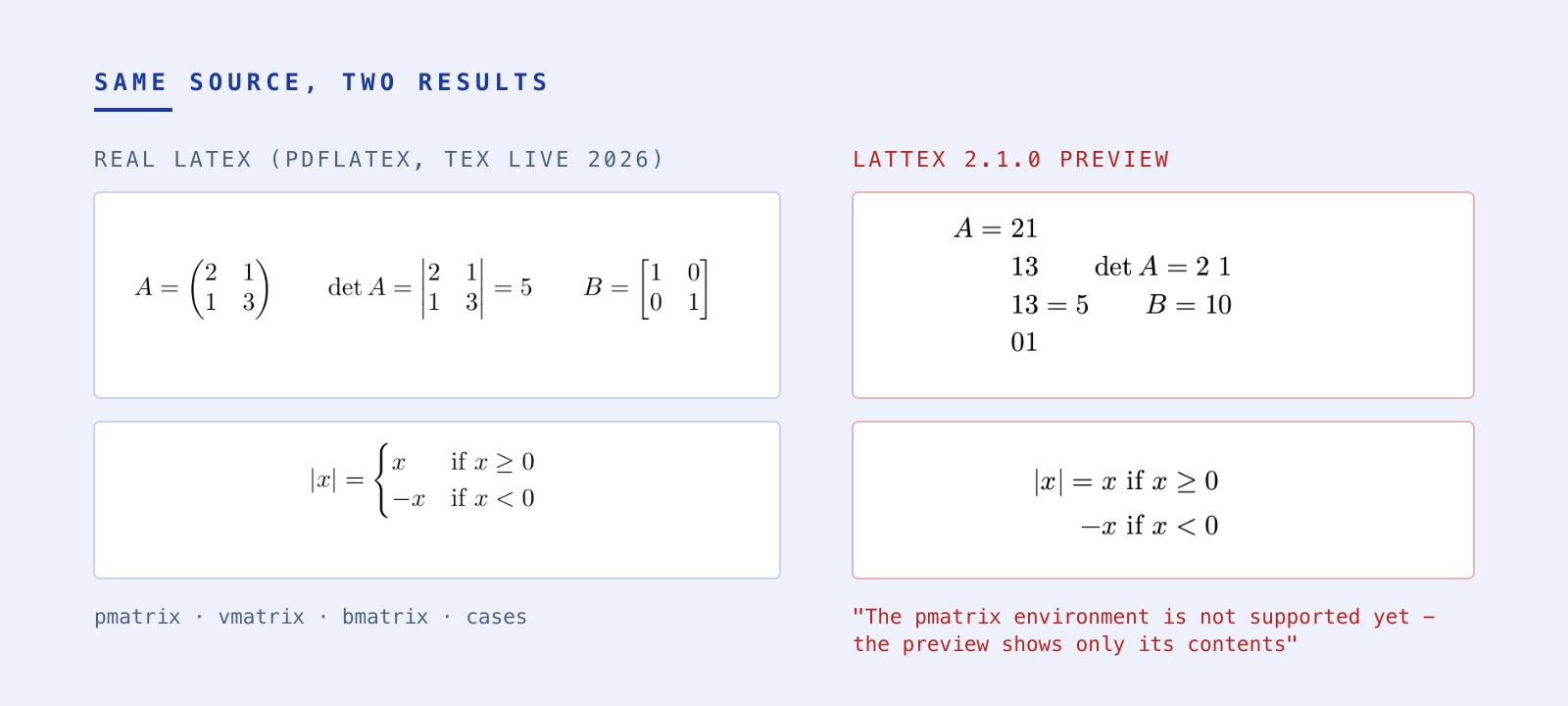
\[ A = \begin{pmatrix} 2 & 1 \\ 1 & 3 \end{pmatrix} \qquad
   \det A = \begin{vmatrix} 2 & 1 \\ 1 & 3 \end{vmatrix} = 5 \]
\[ |x| = \begin{cases} x & \text{if } x \geq 0 \\
                      -x & \text{if } x < 0 \end{cases} \]
Put an ampersand between entries and a double backslash between rows. A pmatrix uses round brackets, a bmatrix uses square brackets, and a vmatrix draws vertical determinant bars. The cases environment pairs a value with a condition. LatteX's preview doesn't draw these yet, and the last section of this guide says what to do.
The symbols you will type every week
| What | Type | Notes |
|---|---|---|
| Greek letters | \alpha \beta \theta \lambda \pi \sigma \Delta \Omega |
capital letter for the capital Greek letter |
| Less / greater or equal, not equal | \leq \geq \neq |
|
| Approximately, plus or minus | \approx \pm |
|
| Times, dot, divide | \times \cdot \div |
|
| In, not in, subset | \in \notin \subseteq |
|
| Union, intersection, empty set | \cup \cap \emptyset |
|
| Number sets | \mathbb{R} \mathbb{N} \mathbb{Z} |
needs amssymb |
| For all, there exists | \forall \exists |
|
| Arrows | \to \Rightarrow \iff |
\to is also the arrow under a limit |
| Infinity, partial, gradient | \infty \partial \nabla |
|
| Functions set upright | \sin x \cos x \log x \ln x |
a plain sin would print as three italic letters |
| Vectors and accents | \vec{v} \bar{x} \hat{n} |
|
| Words inside math | \text{if } |
keeps the spaces you type |
Doing the same homework in LatteX
If you want a working document immediately, pick the Math or Worksheet starter from the Academic group on the Home screen in LatteX. The Math starter opens with an inline equation and two display equations, giving you a sum and a fraction to edit right away. The Worksheet starter drops in a "Problem Set" heading above a numbered list of three problems. Creating a new document asks where it lives and writes the file before you type.
Autocomplete handles the syntax. When you are inside math, you can type the bare name of a command like frac or alpha and the editor inserts the real thing. A \frac comes with two fields to fill, while \sum and \int provide fields for their limits. For the symbols you cannot remember, the picker lets you search 169 different characters across eight groups by name or meaning. Because every word has to match, searching "not equal" finds and inserts \neq. Every symbol in the picker is one the preview can draw. If you click one outside math, it wraps it in dollar signs.
The preview refreshes about a quarter of a second after you stop typing, and the last good render stays on screen while you fix a mistake. When you hit Export PDF for handing in, the save dialog takes the name straight from your document. Paper size is not set in that dialog. It comes entirely from your \documentclass line, where adding [letterpaper] produces US Letter and leaving it out defaults to A4. Both Letter and A4 work on Mac and Windows. If an error breaks the layout, the PDF export fails and says so.
What the preview won't draw yet
LatteX's preview isn't a TeX engine. Matrix environments and cases are flagged as unsupported, and the output is unusable. If your homework is mostly linear algebra, LatteX isn't the tool for it yet. Theorem and proof environments show only their text, with no label. TikZ drawings come out as their code in plain text. The Problems list flags most of these unsupported commands, errors, and warnings right on their line, but \mathbf and \date are silent.
Some failures block export, while others just fail quietly. Writing \sqrt[3]{...} is an error that stops the page rendering entirely and blocks your PDF export, so you should write 8^{1/3} instead. The \pmod command prints wrong, but \mod works fine. A \mathbf{v} comes out plain instead of bold and nothing warns you, making \boldsymbol{v} or \vec{v} the better choice. The preview skips \boxed and \underbrace with a warning, but \date is just dropped from the page and nothing tells you.
Because the app doesn't load packages, you get no \newcommand and no \DeclareMathOperator. Reading errors when something breaks is how you figure out what to do when a document stops rendering entirely.
For a first- or second-year problem set full of equations, fractions, integrals, and sums, the preview handles the heavy lifting. Matrices will have to wait. You can try LatteX through the membership trial. The trial runs for 7 days and needs a card, but you aren't charged during the trial.